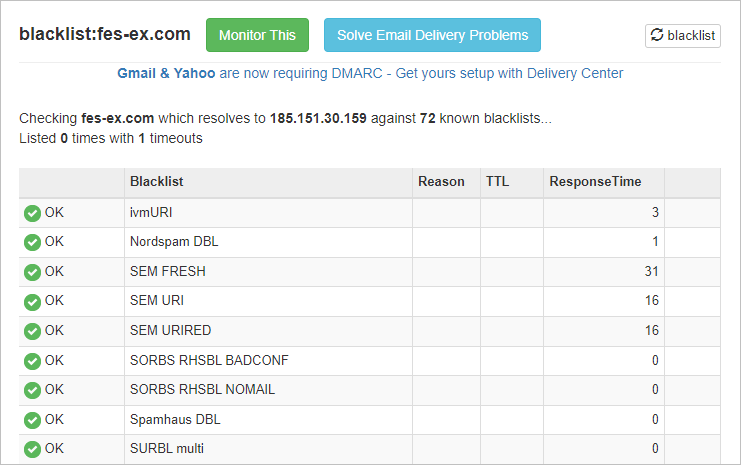
Email services often use multiple blacklists in their spam filter system to weed out mail that may be from insecure and malicious senders. This, in general, is a good thing, but it’s not fool-proof. Something as simple as an accidental click on “report as spam” can get a company added to a blacklist. It’s unfortunate, but it does happen. Fortunately, most blacklist services provide automated removals, or provide a way to request removal. The first step, however, is to check if you’re on a blacklist to begin with.
There are several places on the Internet that allow blacklist checking, including ways to check multiple services at once. The most common one, it seems, is MX Toolbox. It’s very easy to use, and for signed-in users (free) it provides a very useful facility: to set up a simple blacklist monitor (free, or paid with extra features) that will send an email if it finds a blacklist entry has been added.
Shown below is a brief guide on how to run a manual blacklisted domain check.

- Click here to visit the MX Toolbox Blacklist page. (Opens in a new tab/window)
- Enter the domain name to be checked into the Server IP or Domain box. (An IP address can be entered instead, if that is what you need to check)

- Click the Blacklist Check button to perform the checks.

All being well, you should only see green circles with white ticks and the word OK next to them. However, if there are any entries showing as a red circle with white X and the word LISTED, then the domain has been added to the related blacklist.
Removal from a blacklist service is usually fairly straightforward, but each provider has different methods for removal. A few providers automatically remove the entry after a number of days and may or may not provide a method to request removal, but most require a form to be submitted on the list provider’s website.
There are currently 72 active blacklists providers on the MX Toolbox Blacklist check. Each provider has a different requirement for list removal, which is, unfortunately, outside the scope of this guide. However, as the MX Toobox check provides the name of the blacklist provider, a simple Google search for the name (together with the word delist) should locate the related service.